youtube-transcript.ai

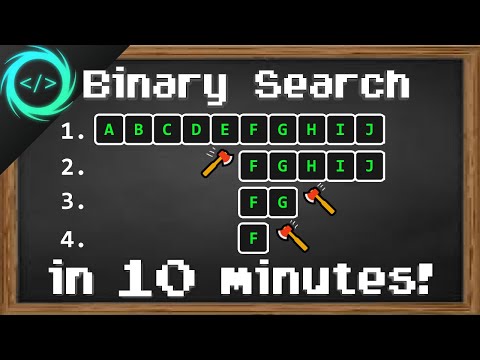
Learn Binary Search in 10 minutes 🪓

Watch with subtitles, summary & AI chat
Add the free Subkun extension — works directly on YouTube.
  • Watch
  • Subtitles
  • Summary
  • Ask AI
Try free →

Binary search is an efficient algorithm for finding a target value within a sorted array by repeatedly dividing the search interval in half. It works by comparing the target value to the middle element of the array and eliminating the half where the target cannot be. This process continues until the target is found or the interval is empty.

Full Transcript (Bilingual)

https://www.youtube.com/watch?v=xrMppTpoqdw
Translation: pt-BR

[00:00] hey everyone it's you bro hope you're doing well
Olá a todos, é o seu mano, espero que esteja tudo bem

[00:03] and in this video i'm going to explain the binary search algorithm in computer science
e neste vídeo vou explicar o algoritmo de busca binária em ciência da computação

[00:07] so sit back relax and enjoy the show
então sente-se, relaxe e aproveite o show

[00:12] all right binary search it's a search algorithm that finds the position of a target value within a sorted array or other collection
tudo bem, busca binária, é um algoritmo de busca que encontra a posição de um valor alvo dentro de um array ordenado ou outra coleção

[00:21] in order for a binary search to work whatever we're searching through it needs to be sorted
para que uma busca binária funcione, o que quer que estejamos procurando precisa estar ordenado

[00:24] and basically what we do is we take half of the array and eliminate it during each step
e basicamente o que fazemos é pegar metade do array e eliminá-lo durante cada etapa

[00:30] and we will whittle down our collection until there is only one element remaining
e reduziremos nossa coleção até que reste apenas um elemento

[00:35] in this example i have an array of 11 elements
neste exemplo, tenho um array de 11 elementos

[00:37] each element contains a letter and they're all sorted alphabetically
cada elemento contém uma letra e todos estão ordenados alfabeticamente

[00:41] let's say we are looking for the letter h and i need the index
digamos que estamos procurando a letra h e eu preciso do índice

[00:45] what we would do with a binary search is that we always begin in the middle
o que faríamos com uma busca binária é que sempre começamos no meio

[00:48] we first check to see if our target value is equal to this middle value
primeiro verificamos se nosso valor alvo é igual a este valor do meio

[00:53] if these are equal then we can return this index but odds are they're probably not going to be equal on the very first turn
se estes forem iguais, então podemos retornar este índice, mas as chances são de que provavelmente não serão iguais na primeira tentativa

[00:58] the very first step
o primeiro passo

[01:01] the very first step so these are not equal then we will
o primeiro passo então estes não são iguais então nós vamos

[01:03] so these are not equal then we will check to see if our target value
então estes não são iguais então vamos verificar se o nosso valor alvo

[01:06] check to see if our target value is greater than or less than this middle
verificar se o nosso valor alvo é maior ou menor que este meio

[01:08] is greater than or less than this middle value
é maior ou menor que este valor do meio

[01:09] value since h is greater than f we can
valor já que h é maior que f nós podemos

[01:11] since h is greater than f we can disregard
já que h é maior que f nós podemos desconsiderar

[01:12] disregard this entire first half of our array
desconsiderar esta primeira metade inteira do nosso array

[01:14] this entire first half of our array because since this is sorted
esta primeira metade inteira do nosso array porque já que está ordenado

[01:16] because since this is sorted our target value could not possibly be
porque já que está ordenado o nosso valor alvo não poderia possivelmente estar

[01:19] our target value could not possibly be within this first portion
o nosso valor alvo não poderia possivelmente estar dentro desta primeira porção

[01:20] within this first portion and then we begin step two or phase two
dentro desta primeira porção e então nós começamos o passo dois ou a fase dois

[01:23] and then we begin step two or phase two it's the same process as before
e então nós começamos o passo dois ou a fase dois é o mesmo processo de antes

[01:25] it's the same process as before so again we begin in the middle check to
é o mesmo processo de antes então novamente começamos no meio verificamos

[01:27] so again we begin in the middle check to see if our target value
então novamente começamos no meio verificamos se o nosso valor alvo

[01:29] see if our target value is equal to the middle value there or
verificamos se o nosso valor alvo é igual ao valor do meio ali ou

[01:31] is equal to the middle value there or not check to see if our target value
é igual ao valor do meio ali ou não verificamos se o nosso valor alvo

[01:33] not check to see if our target value is greater than or less than the middle
não verificamos se o nosso valor alvo é maior ou menor que o meio

[01:36] is greater than or less than the middle value
é maior ou menor que o valor do meio

[01:36] value this time h is less than i we would
valor desta vez h é menor que i nós iríamos

[01:39] this time h is less than i we would delete the
desta vez h é menor que i nós iríamos deletar o

[01:40] delete the second half of this portion we're not
deletar a segunda metade desta porção nós não estamos

[01:42] second half of this portion we're not actually deleting these values we're
segunda metade desta porção nós não estamos realmente deletando estes valores nós estamos

[01:43] actually deleting these values we're disregarding them
realmente deletando estes valores nós estamos desconsiderando eles

[01:45] disregarding them and then we can move on to step three
desconsiderando eles e então nós podemos passar para o passo três

[01:46] and then we can move on to step three we're repeating the same process as
e então nós podemos passar para o passo três nós estamos repetindo o mesmo processo de

[01:48] we're repeating the same process as before
nós estamos repetindo o mesmo processo de antes

[01:49] before and this time these elements divide
antes e desta vez estes elementos dividem

[01:51] and this time these elements divide evenly so we would just round down and
e desta vez estes elementos dividem igualmente então nós apenas arredondaríamos para baixo e

[01:53] evenly so we would just round down and begin
igualmente então nós apenas arredondaríamos para baixo e começaríamos

[01:54] begin and say that this is the middle so h is
começaríamos e diríamos que este é o meio então h é

[01:56] and say that this is the middle so h is greater than
e diríamos que este é o meio então h é maior que

[01:57] greater than g we would disregard this element and we
maior que g nós iríamos desconsiderar este elemento e nós

[02:01] g we would disregard this element and we only have h remaining so we would return
g nós iríamos desconsiderar este elemento e nós temos apenas h restante então nós retornaríamos

[02:03] only have h remaining so we would return this index because these values are
só resta h, então retornaríamos este índice porque esses valores são

[02:05] this index because these values are equal and that's a binary search
este índice porque esses valores são iguais e essa é uma busca binária

[02:08] equal and that's a binary search now a binary search isn't too efficient
iguais e essa é uma busca binária. Agora, uma busca binária não é muito eficiente

[02:10] now a binary search isn't too efficient when working with
Agora, uma busca binária não é muito eficiente ao trabalhar com

[02:11] when working with small data sets however if you're
ao trabalhar com pequenos conjuntos de dados. No entanto, se você estiver

[02:13] small data sets however if you're working with a large data set like
pequenos conjuntos de dados. No entanto, se você estiver trabalhando com um grande conjunto de dados como

[02:15] working with a large data set like 1 million elements well then a binary
trabalhando com um grande conjunto de dados como 1 milhão de elementos, bem, então uma binária

[02:18] 1 million elements well then a binary search is actually fantastic
1 milhão de elementos, bem, então uma busca binária é realmente fantástica

[02:20] search is actually fantastic because we're eliminating half of the
busca é realmente fantástica porque estamos eliminando metade dos

[02:21] because we're eliminating half of the elements we are searching through
porque estamos eliminando metade dos elementos que estamos pesquisando

[02:23] elements we are searching through during each phase or turn so if we had a
elementos que estamos pesquisando durante cada fase ou turno. Então, se tivéssemos um

[02:26] during each phase or turn so if we had a million elements
durante cada fase ou turno. Então, se tivéssemos um milhão de elementos

[02:27] million elements after the first phase we can already
milhão de elementos. Após a primeira fase, já podemos

[02:29] after the first phase we can already disregard like half a million elements
após a primeira fase, já podemos desconsiderar cerca de meio milhão de elementos

[02:32] disregard like half a million elements and then we just repeat the process
desconsiderar cerca de meio milhão de elementos e então apenas repetimos o processo

[02:33] and then we just repeat the process until there's only one left
e então apenas repetimos o processo até que reste apenas um

[02:35] until there's only one left so if this was an iterative approach we
até que reste apenas um. Então, se esta fosse uma abordagem iterativa, nós

[02:37] so if this was an iterative approach we would need to search through these
Então, se esta fosse uma abordagem iterativa, precisaríamos pesquisar por estes

[02:39] would need to search through these linearly beginning with
precisaríamos pesquisar por estes linearmente, começando com

[02:40] linearly beginning with you know index zero and going all the
linearmente, começando com, você sabe, o índice zero e indo até todo o

[02:42] you know index zero and going all the way to a million so a binary search is
você sabe, o índice zero e indo até um milhão. Então, uma busca binária é

[02:45] way to a million so a binary search is fantastic with large data sets
caminho até um milhão. Então, uma busca binária é fantástica com grandes conjuntos de dados

[02:47] fantastic with large data sets the runtime complexity of a binary
fantástica com grandes conjuntos de dados. A complexidade de tempo de execução de uma binária

[02:49] the runtime complexity of a binary search is o of log
a complexidade de tempo de execução de uma busca binária é O de log

[02:51] search is o of log n the larger the data set a binary
busca é O de log n. Quanto maior o conjunto de dados, uma binária

[02:53] n the larger the data set a binary search becomes more and more efficient
n. Quanto maior o conjunto de dados, uma busca binária se torna cada vez mais eficiente

[02:55] search becomes more and more efficient compared to other search algorithms
busca se torna cada vez mais eficiente em comparação com outros algoritmos de busca

[02:57] compared to other search algorithms alright let's perform a binary search in
em comparação com outros algoritmos de busca. Tudo bem, vamos realizar uma busca binária em

[02:59] alright let's perform a binary search in real life now we'll use the built-in
Tudo bem, vamos realizar uma busca binária na vida real. Agora usaremos o embutido

[03:02] real life now we'll use the built-in binary search method of arrays to begin
vida real. Agora usaremos o método de busca binária embutido de arrays para começar

[03:04] binary search method of arrays to begin with and then later on we'll build our.
método de busca binária de arrays para começar e depois construiremos o nosso.

[03:06] with and then later on we'll build our own binary search function.
com e depois construiremos nossa própria função de busca binária.

[03:07] own binary search function so we'll need an array to work with.
própria função de busca binária, então precisaremos de um array para trabalhar.

[03:09] so we'll need an array to work with let's say we have an array of integers.
então precisaremos de um array para trabalhar, digamos que temos um array de inteiros.

[03:11] let's say we have an array of integers named array.
digamos que temos um array de inteiros chamado array.

[03:12] named array int array and the size of this array.
chamado array int array e o tamanho deste array.

[03:15] int array and the size of this array will be 100.
array int array e o tamanho deste array será 100.

[03:16] will be 100 we'll increase the size later for.
será 100, aumentaremos o tamanho mais tarde para.

[03:17] we'll increase the size later for demonstration purposes.
aumentaremos o tamanho mais tarde para fins de demonstração.

[03:19] demonstration purposes and we'll need a target value that we're.
fins de demonstração e precisaremos de um valor alvo que estamos.

[03:21] and we'll need a target value that we're searching for i'll just name this target.
e precisaremos de um valor alvo que estamos procurando, vou apenas chamar isso de alvo.

[03:23] searching for i'll just name this target and target equals what about 42 we'll.
procurando, vou apenas chamar isso de alvo e alvo igual a que tal 42 nós.

[03:25] and target equals what about 42 we'll search for the number 42 and we'll need.
e alvo igual a que tal 42, buscaremos o número 42 e precisaremos.

[03:27] search for the number 42 and we'll need to.
buscar o número 42 e precisaremos.

[03:28] to populate our array so we can do so using.
popular nosso array, então podemos fazer isso usando.

[03:30] populate our array so we can do so using a for loop int.
popular nosso array, então podemos fazer isso usando um loop for int.

[03:32] a for loop int i equals zero we will continue this for.
um loop for int i igual a zero, continuaremos este.

[03:35] i equals zero we will continue this for loop as long.
i igual a zero, continuaremos este loop enquanto.

[03:35] loop as long as i is less than array dot length.
loop enquanto i for menor que array.length.

[03:39] as i is less than array dot length and increment i by one during each.
enquanto i for menor que array.length e incrementaremos i em um durante cada.

[03:42] and increment i by one during each iteration.
e incrementaremos i em um durante cada iteração.

[03:43] iteration then we will fill array at index i.
iteração, então preencheremos o array no índice i.

[03:46] then we will fill array at index i with whatever i is our index.
então preencheremos o array no índice i com o que quer que i seja nosso índice.

[03:49] with whatever i is our index okay so the cheap way of using a binary.
com o que quer que i seja nosso índice, ok, então a maneira barata de usar um binário.

[03:53] okay so the cheap way of using a binary search.
ok, então a maneira barata de usar uma busca binária.

[03:53] search is to use the built-in binary search.
busca é usar a busca binária integrada.

[03:56] is to use the built-in binary search method of arrays.
é usar o método de busca binária integrado de arrays.

[03:57] method of arrays let's say int index.
método de arrays, digamos que int index.

[04:01] let's say int index equals arrays dot.
digamos que int index seja igual a arrays.

[04:04] equals arrays dot binary search and taking a look at this.
equivale arrays ponto busca binária e dando uma olhada nisso.

[04:08] binary search and taking a look at this binary search method.
busca binária e dando uma olhada neste método de busca binária.

[04:09] binary search method there's two arguments that we have to pass in an array.
método de busca binária há dois argumentos que temos que passar em um array.

[04:11] there's two arguments that we have to pass in an array and whatever we're searching for so we will pass in our array and our target then return the index.
há dois argumentos que temos que passar em um array e o que quer que estejamos procurando, então passaremos nosso array e nosso alvo, então retornaremos o índice.

[04:13] pass in an array and whatever we're searching for so we will pass in our array and our target then return the index.
passar em um array e o que quer que estejamos procurando, então passaremos nosso array e nosso alvo, então retornaremos o índice.

[04:16] our array and our target then return the index and let's display that so let's check to see if our index is equal to negative one.
nosso array e nosso alvo, então retorne o índice e vamos exibir isso, então vamos verificar para ver se nosso índice é igual a menos um.

[04:20] index and let's display that so let's check to see if our index is equal to negative one.
índice e vamos exibir isso, então vamos verificar para ver se nosso índice é igual a menos um.

[04:23] and let's display that so let's check to see if our index is equal to negative one.
e vamos exibir isso, então vamos verificar para ver se nosso índice é igual a menos um.

[04:23] see if our index is equal to negative one if our target is not found then that means negative one will be returned from our binary search method.
ver se nosso índice é igual a menos um se nosso alvo não for encontrado, então isso significa que menos um será retornado do nosso método de busca binária.

[04:28] if our index is equal to negative one if our target is not found then that means negative one will be returned from our binary search method.
se nosso índice for igual a menos um se nosso alvo não for encontrado, então isso significa que menos um será retornado do nosso método de busca binária.

[04:30] if our target is not found then that means negative one will be returned from our binary search method.
se nosso alvo não for encontrado, então isso significa que menos um será retornado do nosso método de busca binária.

[04:31] means negative one will be returned from our binary search method.
significa que menos um será retornado do nosso método de busca binária.

[04:33] negative one will be returned from our binary search method.
menos um será retornado do nosso método de busca binária.

[04:34] binary search method so let's print something system.out.printline uh what about element not found.
método de busca binária então vamos imprimir algo system.out.printline uh que tal elemento não encontrado.

[04:36] so let's print something system.out.printline uh what about element not found.
então vamos imprimir algo system.out.printline uh que tal elemento não encontrado.

[04:38] system.out.printline uh what about element not found.
system.out.printline uh que tal elemento não encontrado.

[04:42] uh what about element not found actually better yet target not found let me change that.
uh que tal elemento não encontrado na verdade melhor ainda alvo não encontrado deixe-me mudar isso.

[04:44] actually better yet target not found let me change that.
na verdade melhor ainda alvo não encontrado deixe-me mudar isso.

[04:45] me change that target plus not found.
mudar isso alvo mais não encontrado.

[04:48] target plus not found okay then else else we will display system.out.printline.
alvo mais não encontrado ok então senão senão exibiremos system.out.printline.

[04:52] okay then else else we will display system.out.printline.
ok então senão senão exibiremos system.out.printline.

[04:54] else we will display system.out.printline.
senão exibiremos system.out.printline.

[04:57] system.out.printline element found at colon space plus index.
system.out.printline elemento encontrado em dois pontos espaço mais índice.

[05:01] element found at colon space plus index.
elemento encontrado em dois pontos espaço mais índice.

[05:05] colon space plus index all right let's try it okay element
dois pontos espaço mais índice tudo bem vamos tentar isso ok elemento

[05:08] all right let's try it okay element found at 42
tudo bem vamos tentar isso ok elemento encontrado em 42

[05:10] found at 42 cool now let's create our own binary
encontrado em 42 legal agora vamos criar nossa própria binária

[05:12] cool now let's create our own binary search function for practice
legal agora vamos criar nossa própria função de busca binária para praticar

[05:13] search function for practice i'll turn this line into a comment copy
função de busca para praticar vou transformar esta linha em um comentário copiar

[05:16] i'll turn this line into a comment copy it
vou transformar esta linha em um comentário copiá-la

[05:17] it paste it and get rid of this erase
colá-la e livrar-se desta apagar

[05:18] paste it and get rid of this erase portion
colá-la e livrar-se desta parte de apagar

[05:20] portion okay then i'm just going to use a
parte ok então eu vou apenas usar um

[05:22] okay then i'm just going to use a shortcut to generate this function
ok então eu vou apenas usar um atalho para gerar esta função

[05:25] shortcut to generate this function okay so private static int binary search
atalho para gerar esta função ok então int binário estático privado busca

[05:28] okay so private static int binary search there are two parameters an array of
ok então int binário estático privado busca existem dois parâmetros um array de

[05:31] there are two parameters an array of integers named array
existem dois parâmetros um array de inteiros chamado array

[05:32] integers named array and int target so we'll return negative
inteiros chamado array e int alvo então retornaremos negativo

[05:35] and int target so we'll return negative one
e int alvo então retornaremos menos um

[05:36] one that acts as a sentinel value negative 1
um que atua como um valor sentinela menos 1

[05:38] that acts as a sentinel value negative 1 means that
que atua como um valor sentinela menos 1 significa que

[05:39] means that the value was not found now what we'll
significa que o valor não foi encontrado agora o que nós

[05:42] the value was not found now what we'll need at this point
o valor não foi encontrado agora o que precisaremos neste ponto

[05:43] need at this point is the beginning and ending index of our
precisaremos neste ponto é o índice inicial e final do nosso

[05:45] is the beginning and ending index of our array so let's say
é o índice inicial e final do nosso array então vamos dizer

[05:47] array so let's say int low will be the beginning and int
array então vamos dizer que int low será o início e int

[05:50] int low will be the beginning and int high
int low será o início e int high

[05:50] high is the end array dot length
high é o fim array ponto length

[05:54] is the end array dot length minus one so we have a low index and
é o fim array ponto length menos um então temos um índice baixo e

[05:57] minus one so we have a low index and high index and we'll create a while loop
menos um então temos um índice baixo e um índice alto e criaremos um loop while

[06:01] high index and we'll create a while loop while low is less than or equal to high
índice alto e criaremos um loop while enquanto low for menor ou igual a high

[06:05] while low is less than or equal to high we'll continue this while loop
enquanto low for menor ou igual a high continuaremos este loop while

[06:06] we'll continue this while loop and keep on searching through our array
continuaremos este loop while e continuaremos pesquisando em nosso array

[06:09] and keep on searching through our array so first we need
e continuaremos pesquisando em nosso array, então primeiro precisamos

[06:10] so first we need the middle index int middle
então primeiro precisamos do índice do meio int middle

[06:13] the middle index int middle and here's the formula for that low plus
o índice do meio int middle e aqui está a fórmula para isso low plus

[06:17] and here's the formula for that low plus high minus low divided by two
e aqui está a fórmula para isso low plus high minus low dividido por dois

[06:21] high minus low divided by two so we have our middle index we will take
high minus low dividido por dois, então temos nosso índice do meio, vamos pegar

[06:25] so we have our middle index we will take int value equals our array
então temos nosso índice do meio, vamos pegar int value equals nosso array

[06:29] int value equals our array at index of middle so this will extract
int value equals nosso array no índice do meio, então isso irá extrair

[06:32] at index of middle so this will extract that value found within
no índice do meio, então isso irá extrair esse valor encontrado dentro

[06:34] that value found within this element okay so this portion is
esse valor encontrado dentro deste elemento, ok, então esta parte é

[06:37] this element okay so this portion is optional i'm just going to display
este elemento, ok, então esta parte é opcional, eu apenas vou exibir

[06:38] optional i'm just going to display whatever this value is
opcional, eu apenas vou exibir qualquer que seja esse valor

[06:40] whatever this value is so we can count the amount of steps it's
qualquer que seja esse valor, para que possamos contar a quantidade de passos que está

[06:41] so we can count the amount of steps it's going to take to find a value
para que possamos contar a quantidade de passos que levará para encontrar um valor

[06:43] going to take to find a value so let's say middle colon space whatever
levará para encontrar um valor, então vamos dizer middle dois pontos espaço qualquer

[06:47] so let's say middle colon space whatever this value is this line of code is
então vamos dizer middle dois pontos espaço qualquer que seja esse valor, esta linha de código é

[06:49] this value is this line of code is optional i'm just doing this for
esse valor é esta linha de código é opcional, estou fazendo isso apenas para

[06:50] optional i'm just doing this for educational purposes
opcional, estou fazendo isso apenas para fins educacionais

[06:52] educational purposes okay now we need to check to see if our
fins educacionais, ok, agora precisamos verificar se nosso

[06:54] okay now we need to check to see if our value is
ok, agora precisamos verificar se nosso valor é

[06:55] value is less than or greater than our target or
valor é menor ou maior que nosso alvo ou

[06:58] less than or greater than our target or equal to
menor ou maior que nosso alvo ou igual a

[07:00] equal to if value
igual a se valor

[07:03] if value is less than our target
se o valor for menor que nosso alvo

[07:07] low equals middle plus
baixo é igual a meio mais

[07:11] low equals middle plus one and actually i'm going to get rid of
baixo é igual a meio mais um e na verdade vou remover

[07:13] one and actually i'm going to get rid of these curly braces
um e na verdade vou remover essas chaves

[07:14] these curly braces if you have an if statement and you only
essas chaves se você tem uma instrução if e você só tem

[07:16] if you have an if statement and you only have like one line of code you don't
se você tem uma instrução if e você só tem tipo uma linha de código você não

[07:17] have like one line of code you don't really need
tem tipo uma linha de código você realmente não precisa

[07:18] really need the curly braces i'm just doing this so
realmente precisa das chaves estou fazendo isso para que

[07:21] the curly braces i'm just doing this so it's easier to read
as chaves estou fazendo isso para que seja mais fácil de ler

[07:22] it's easier to read okay else if
seja mais fácil de ler ok senão se

[07:26] value is greater than target
valor é maior que o alvo

[07:30] value is greater than target we will set our height index high equals
valor é maior que o alvo definiremos nosso índice de altura alto igual a

[07:34] we will set our height index high equals middle minus one
definiremos nosso índice de altura alto igual a meio menos um

[07:37] middle minus one else that means we have found our target
meio menos um senão isso significa que encontramos nosso alvo

[07:39] else that means we have found our target else
senão isso significa que encontramos nosso alvo senão

[07:40] else return middle
senão retorna meio

[07:43] return middle so this means that target is found
retorna meio então isso significa que o alvo foi encontrado

[07:48] so this means that target is found and by returning negative one that means
então isso significa que o alvo foi encontrado e ao retornar menos um isso significa

[07:50] and by returning negative one that means target
e ao retornar menos um isso significa alvo

[07:51] target not found and that is our binary search
alvo não encontrado e essa é nossa busca binária

[07:54] not found and that is our binary search function
não encontrado e essa é nossa função de busca binária

[07:55] function let's try it okay element found at 42
função vamos tentar ok elemento encontrado em 42

[07:58] let's try it okay element found at 42 so it took us let's see one two three
vamos tentar ok elemento encontrado em 42 então nos levou vamos ver um dois três

[08:01] so it took us let's see one two three four four steps to find the number 42
então nos levou vamos ver um dois três quatro quatro passos para encontrar o número 42

[08:04] four four steps to find the number 42 within this array of 100 elements
quatro quatro passos para encontrar o número 42 dentro deste array de 100 elementos

[08:06] within this array of 100 elements now let's increase the size because
dentro deste array de 100 elementos agora vamos aumentar o tamanho porque

[08:08] now let's increase the size because binary searches do extremely well
agora vamos aumentar o tamanho porque as buscas binárias se saem extremamente bem

[08:10] binary searches do extremely well with large data sets so let's say we
as buscas binárias se saem extremamente bem com grandes conjuntos de dados, então digamos que temos

[08:13] with large data sets so let's say we have
com grandes conjuntos de dados, então digamos que temos

[08:13] have 1 million elements and let's change this
1 milhão de elementos e vamos mudar isso

[08:15] 1 million elements and let's change this target
1 milhão de elementos e vamos mudar esse alvo

[08:16] target what about 700
alvo, que tal 700

[08:19] what about 700 7 thousands whatever that number is
que tal 700 7 mil, seja qual for esse número

[08:23] 7 thousands whatever that number is okay so let's search for it and let's
7 mil, seja qual for esse número, ok, então vamos procurá-lo e vamos

[08:25] okay so let's search for it and let's count the steps
ok, então vamos procurá-lo e vamos contar os passos

[08:27] count the steps uh so there's quite a number of steps
contar os passos, uh, então há um bom número de passos

[08:29] uh so there's quite a number of steps here but let's count them
uh, então há um bom número de passos aqui, mas vamos contá-los

[08:31] here but let's count them 1 2 3 4 5 6 7
aqui, mas vamos contá-los, 1 2 3 4 5 6 7

[08:34] 1 2 3 4 5 6 7 8 9 10 11 12 13 14 15
1 2 3 4 5 6 7 8 9 10 11 12 13 14 15

[08:38] 8 9 10 11 12 13 14 15 16 17 18 19 20 20 steps
8 9 10 11 12 13 14 15 16 17 18 19 20 20 passos

[08:41] 16 17 18 19 20 20 steps now imagine if we took a linear approach
16 17 18 19 20 20 passos, agora imagine se tivéssemos uma abordagem linear

[08:43] now imagine if we took a linear approach where we began
agora imagine se tivéssemos uma abordagem linear onde começamos

[08:44] where we began at index zero and looped through this
onde começamos no índice zero e percorremos este

[08:46] at index zero and looped through this entire array
no índice zero e percorremos todo este array

[08:47] entire array looking for this index and in that case
todo o array procurando por este índice e, nesse caso,

[08:50] looking for this index and in that case looping through an array would have a
procurando por este índice e, nesse caso, percorrer um array teria uma

[08:51] looping through an array would have a runtime complexity of o event
percorrer um array teria uma complexidade de tempo de O(n)

[08:53] runtime complexity of o event to find this number it's going to take
complexidade de tempo de O(n) para encontrar este número, vai levar

[08:55] to find this number it's going to take over 700 000 steps because we're
para encontrar este número, vai levar mais de 700.000 passos porque estamos

[08:58] over 700 000 steps because we're iterating
mais de 700.000 passos porque estamos iterando

[08:59] iterating once for each element within this array
iterando uma vez para cada elemento dentro deste array

[09:01] once for each element within this array compared to a binary search where it
uma vez para cada elemento dentro deste array, em comparação com uma busca binária onde ela

[09:02] compared to a binary search where it only took 20 steps
em comparação com uma busca binária onde levou apenas 20 passos

[09:04] only took 20 steps well then in conclusion a binary search
levou apenas 20 passos, bem, então, em conclusão, uma busca binária

[09:06] well then in conclusion a binary search is a search
bem, então, em conclusão, uma busca binária é uma busca

[09:07] is a search algorithm that finds the position of a
é um algoritmo de busca que encontra a posição de um

[09:10] algorithm that finds the position of a target value within a sorted array
algoritmo que encontra a posição de um valor alvo dentro de um array ordenado

[09:11] half of the array is eliminated during each step or phase
metade do array é eliminada durante cada etapa ou fase

[09:17] so that's a binary search algorithm if you would like a copy of all this code
então esse é um algoritmo de busca binária se você gostaria de uma cópia de todo este código

[09:21] of course i will post this to the comment section down below
claro, postarei isso na seção de comentários abaixo

[09:24] and that is the binary search algorithm in computer science
e esse é o algoritmo de busca binária em ciência da computação

[09:29] hey you yeah i'm talking to you if you learned something new
ei você, sim, estou falando com você, se você aprendeu algo novo

[09:32] then help me help you in three easy steps by smashing that like button
então me ajude a te ajudar em três passos fáceis, esmagando o botão de like

[09:37] drop a comment down below and subscribe if you'd like to become a fellow bro
deixe um comentário abaixo e se inscreva se você gostaria de se tornar um colega bro

[09:50] you
você

Cite this page

If you're using ChatGPT, Claude, Gemini, or another AI assistant, paste this URL into the chat:

https://youtube-transcript.ai/docs/learn-binary-search-in-10-minutes-9eg3757g3c

The full transcript and summary on this page will be retrieved as context, so the assistant can answer questions about the video accurately.